Affiliate links: if you buy through links on this page we may earn a commission, at no extra cost to you.
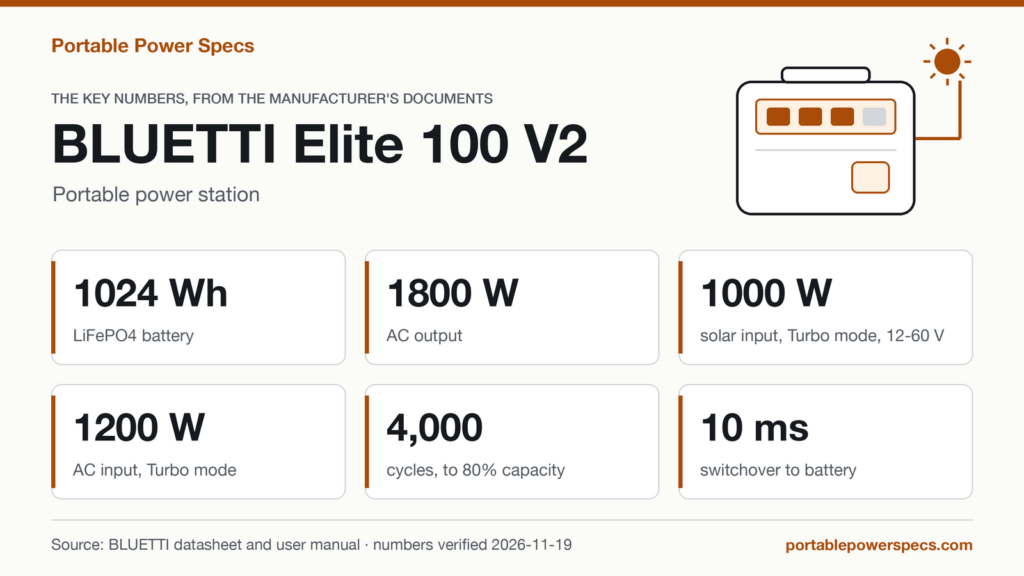
BLUETTI Elite 100 V2: the solar input numbers, verified
Verified against the manufacturer’s Elite 100 V2 User Manual, US edition, V5.1 (opens in a new tab) (version printed on page 1; the file is dated May 2026) and against the Tech Specs table on BLUETTI’s US product page (opens in a new tab), both read on . The figures are for the US edition (120 V).
| Spec | Value | Source |
|---|---|---|
| Battery capacity | 1,024 Wh | Manual V5.1, p. 21 |
| Solar input, DC Input row as printed | DC Input: 1,000W Max., 12V-60V, 20A Max.. The row names no charging mode: the mode rows below list 1,000 W Max. for Turbo only, and 600 W Max. for Standard, the default. | Manual V5.1, p. 21; the same row is in the Tech Specs table |
| Solar input, voltage window | 12 V to 60 V | Manual V5.1, pp. 2, 12 and 21 |
| Solar input, current | 20 A Max. | Manual V5.1, pp. 12 and 21 |
| Solar input, Standard mode (the default) | 600 W Max. | Manual V5.1, p. 16, charging-mode table |
| Solar input, Turbo mode | 1,000 W Max. | Manual V5.1, p. 16, charging-mode table |
| Solar input, Silent mode | 600 W Max. | Manual V5.1, p. 16, charging-mode table (Silent is activated in the app) |
| Solar input connector | Solar Charging Cable: MC4 to XT60 (optional accessory, not in the box) | Manual V5.1, pp. 8 and 12; the manual names the cable, not the port |
| AC input, as the manual prints it | AC Charging: 1,200W Max. (80% in 45 mins @25°C / 77°F); AC Input: 1,800W Max. (Charging + Bypass). The manual’s p. 6 warning: “Risk of Electric Shock. Do not operate this device under a continuous load for more than 3 hours if the AC input current exceeds 12A (when the AC input power is 1440W).” | Manual V5.1, pp. 21 and 6; the p. 16 table lists the 45 minutes under Turbo mode, and no starting charge level is printed |
| AC and DC input together | AC + DC Charging: 1,200W Max. | Manual V5.1, p. 21 |
Which unit this page covers: the base BLUETTI Elite 100 V2, US edition (120 V), 1,024 Wh, not the Elite 200 V2, the Elite 100 mini or a 230 V edition.
Sales status: not verified. This page makes no statement about whether BLUETTI currently sells the Elite 100 V2.
If these solar numbers fit the panels you have in mind, this is where to find the BLUETTI Elite 100 V2.
View the BLUETTI Elite 100 V2 on Amazon (opens in a new tab)
What the numbers mean
One row, three modes: where the 1,000 W sits
The DC Input row of the manual’s specification table prints 1,000W Max. and names no charging mode. The charging-mode table (section 5.2, p. 16) lists a Solar Input figure for each mode: 600 W Max. in Standard, 1,000 W Max. in Turbo and 600 W Max. in Silent. The manual says the unit charges in Standard mode by default, and that Standard and Turbo are set on the display while Silent is activated in the app. That means the only mode that lists 1,000 W Max. for Solar Input is Turbo, and the default mode lists 600 W Max.
| Mode | AC Input | Solar Input | AC + Solar Input |
|---|---|---|---|
| Standard (the default) | 600 W Max. | 600 W Max. | 600 W Max. |
| Turbo | 1,200 W Max. | 1,000 W Max. | 1,200 W Max. |
| Silent | 600 W Max. | 600 W Max. | 600 W Max. |
As printed in the V5.1 manual (file dated May 2026), p. 16; the V2.1 manual (file dated June 2025 (opens in a new tab)) prints the same table. The manual calls these three “AC charging modes” yet gives a Solar Input column, and it does not explain how a mode sets a solar limit or what the unit does with panels above the figure of the mode in use. This page shows the table and the row side by side and does not interpret the column.
Voltage, current and the panel’s Voc
The manual states 12V-60V and 20A Max. for the DC Input. Its solar note (p. 12) asks for panels with Voc 12V-60V and 20A Max., and its tips (p. 2) say not to use panels with an open circuit voltage above 60 V. Voc is the panel’s open circuit voltage, with nothing drawing current from it. This page adds no advice of its own on the 60 V limit. The p. 12 note also prints a power limit with no mode named: read it with the table above.
Dual solar charging: the manual’s own example, in label watts
The manual prints no port count: its legend (p. 9) lists one “DC Input”. For dual solar charging (p. 12) it says to use both sets of the solar cable’s MC4 connectors, connected in parallel, with the same power rating and type of panels on both sets. Its example is two 200W (20V/10A) panels in series on each set: four 200 W panels, 800 W by label. That is above the 600 W Max. the table lists for Standard and Silent, and below the 1,000 W Max. it lists for Turbo. This is our arithmetic on the manual’s example, not a statement of the manual. A label power is a rating, not an output, and this page estimates none.
Is the solar cable in the box? Two manual versions differ
The manual does not name the connector of the DC Input. It names a cable, the Solar Charging Cable, MC4 to XT60 (59.06in / 1.5m), and its FAQ (p. 23) says third-party panels work with an open circuit voltage of 12V-60V and MC4 connectors. That means “MC4 to XT60” names the cable, not the port.
The V5.1 manual lists that cable on p. 8 under “Optional Accessories”, after “The following accessories are not included”. The V2.1 manual shows it in the box group of the same page. BLUETTI’s US product page lists four items in the box and not the cable, and its user guides page still links V2.1 while its US support page links V5.1 (both read 2026-11-19). This page follows V5.1 and the product page, which agree: the cable is not in the box.
The AC side: two labels and a combined row
The manual’s specification table has two AC input rows: “AC Charging”, with the time estimate shown above, and “AC Input” (Charging + Bypass), a row to read together with the p. 6 warning quoted in the table. The US product page prints the same two numbers but gives the label “AC Input” to the other row. That means the label points to different numbers in the two documents; this page uses the manual’s labels. The manual also prints a combined row, AC + DC Charging: 1,200W Max.. That means it prints no combined input figure above 1,200 W, and this page does not add the inputs.
Charging time and charging power
The manual prints no solar charging time. The one time in its specification table belongs to AC: 80% in 45 mins at 25°C / 77°F, listed under Turbo mode on p. 16 with no starting charge level, and the manual says the data “is for reference only”. Its table also lists estimated times for Standard and Silent with no charge level or temperature, which this page does not repeat. This page estimates none. The manual’s FAQ (p. 23) adds that the built-in BMS adjusts the charging power based on battery temperature and SoC, so a figure printed as Max. is a ceiling, not a stated rate.
What it can and can’t do
It can
- Charge from solar panels on the DC Input (Voc 12V-60V, 20A Max.), a wall outlet, a generator or a car’s 12V or 24V cigarette lighter port, per the manual.
- Charge and discharge at the same time (pass-through charging), per the manual’s FAQ.
- Switch to battery power within 10 ms during an outage, per the manual, which says UPS modes are set in the app.
It can’t
- Take solar panels with an open circuit voltage above 60 V: the manual says not to use them.
- Come with the solar charging cable in the box, per the V5.1 manual and the US product page.
- Serve as the UPS for data servers or workstations that require high-performance UPS: the manual’s attention note (p. 19) says it is not for them.
Compatibility
| Item | Verification level | Source |
|---|---|---|
| Solar panels (series or parallel) with Voc 12V-60V, Current 20A Max., Power 1,000W Max. | manufacturer | Manual V5.1 (opens in a new tab), p. 12. The power limit names no mode; the mode table lists 1,000 W Max. for Turbo only |
| Third-party solar panels with open circuit voltage of 12V-60V and MC4 connectors | manufacturer | Manual V5.1, p. 23 (FAQ) |
| Dual solar charging, using both sets of the solar charging cable’s MC4 connectors | manufacturer | Manual V5.1, p. 12: sets connected in parallel, same power rating and type of panels on both |
| Mixing different types of solar panels | manufacturer | Manual V5.1, p. 23 (FAQ): the manual says to avoid it; status: not recommended |
| Solar panels with an open circuit voltage above 60V | manufacturer | Manual V5.1, p. 2: not to be used |
| BLUETTI 100W solar panel | manufacturer | BLUETTI US product page (opens in a new tab), FAQ question 5, read 2026-11-19: “You can pair it with BLUETTI 100W, 200W, or 350W solar panels based on your setup.” No model numbers named |
| BLUETTI 200W solar panel | manufacturer | |
| BLUETTI 350W solar panel | manufacturer | |
| Solar Charging Cable, MC4 to XT60 (59.06in / 1.5m) | manufacturer | Manual V5.1, p. 8: optional accessory, not in the box (a cable, not a panel) |
The three BLUETTI panel rows come from an FAQ answer on a product page, not from the manual, which names no panel model. A panel missing from this table is not “unsupported”: BLUETTI does not name it in the documents we read.
Known issues and recall check
We have no known-issue entries on file for this model.
Recall check
For the BLUETTI Elite 100 V2: no recall found for BLUETTI or the Elite 100 V2 in the CPSC recall database (opens in a new tab) and Health Canada’s recall search (opens in a new tab) on . CPSC’s separate list of consumer product safety warnings does not report BLUETTI or the Elite 100 V2 either on that date. It is the result of a search on that date, not an assessment of the product.
What to buy with it
BLUETTI Elite 100 V2: See the BLUETTI Elite 100 V2 listing (opens in a new tab)
Check the model name, the 1,024 Wh capacity and what the listing includes; this page covers the power station itself.
- Solar panels: the manual asks for a Voc of 12V-60V and names no panel model.
- Solar Charging Cable, MC4 to XT60, and the car charging cable: named by the manual as optional accessories that are not in the box.
FAQ
Answers come from the manufacturer’s manual and product page, not from forum threads.
What are the solar input limits of the BLUETTI Elite 100 V2?
The manual’s DC Input row prints DC Input: 1,000W Max., 12V-60V, 20A Max. with no mode named; its charging-mode table lists 600 W Max. for Solar Input in Standard (the default) and Silent mode and 1,000 W Max. in Turbo mode.
Which mode lists 1,000 W of solar input?
Turbo. In the manual’s table, Standard, the default, and Silent list 600 W Max. under Solar Input.
Does the BLUETTI Elite 100 V2 come with a solar cable?
Not according to the V5.1 manual and the US product page. The V2.1 manual showed it in the box.
How long does solar charging take?
The manual prints no solar charging time, and this page gives none.
Changelog
- : First published.
Edited by Stefano Mastria. Verified against the manufacturer’s US manual V5.1 (file dated May 2026) and the Tech Specs table of the US product page, read on . This site is independent and is not BLUETTI’s website.